Standard band
Schedule
The programme, milestone dates, delay events and the risk register.
What it does
Schedule, in the flow of the work.
The programme, milestone dates, delay events and the risk register.
It sits at step 04 of the sequence a job runs in — after Budget and before Drawings & RFIs — which is how your team will meet it: the work arrives from the screen before it, and leaves to the next one.
Standard band
Priced per company, not per person and not per project. An annual licence is 10 months paid up front — $390 for the year (R6,443).
- Switch on within a day of asking
- Your own installation, your own database
- Buying any module lifts the free tier's caps
In the system
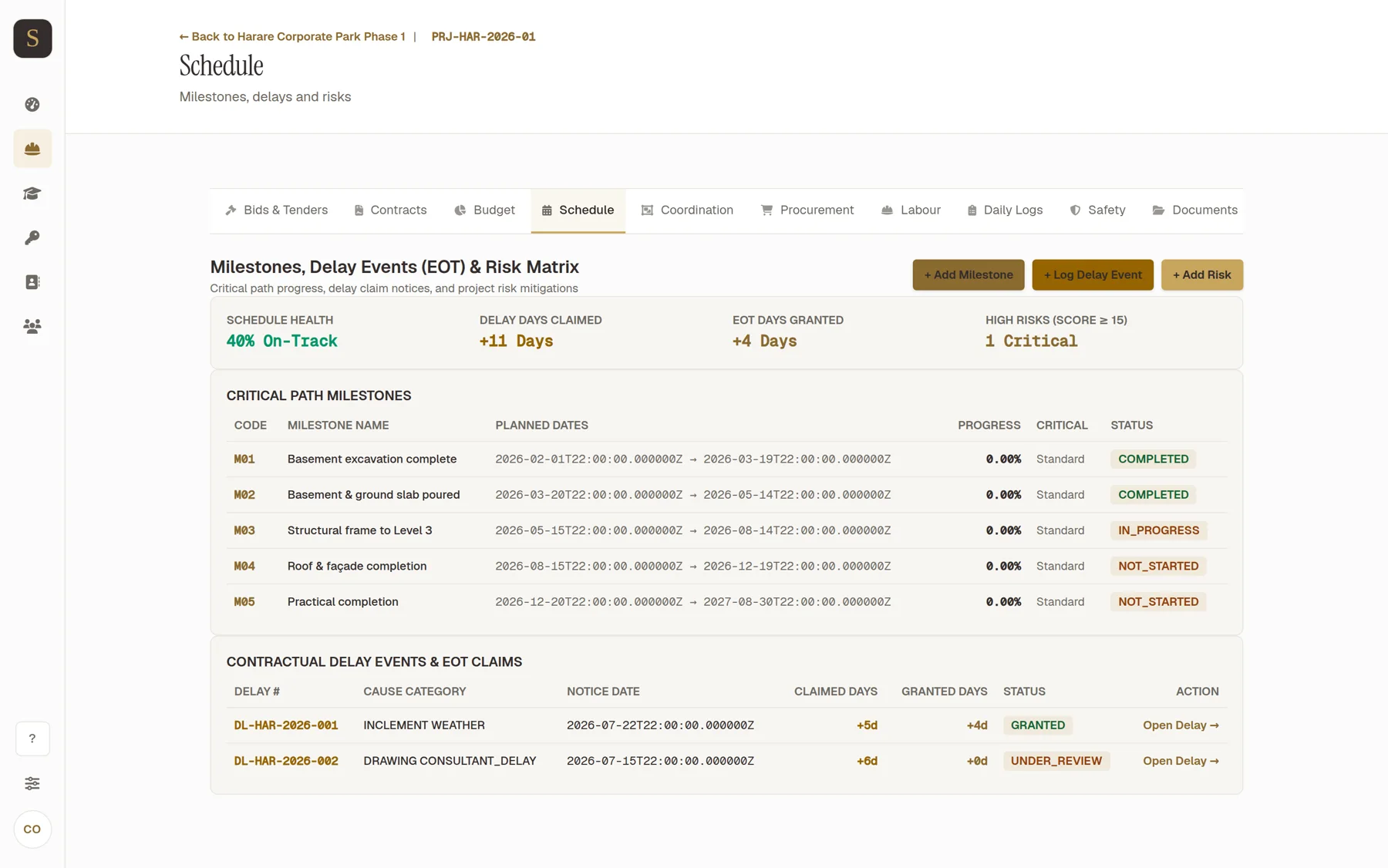
Schedule on screen.
On the screen
What you see, and what each button does.
Read off the product itself, so nothing here is a description of something that does not exist.
The register shows
- Code
- Milestone Name
- Planned Dates
- Progress
- Critical
- Status
- Delay #
- Cause Category
The buttons
- + Add Milestone — Adds a dated milestone to the programme.
- + Log Delay Event — Records a delay with its cause, so an extension-of-time claim has a record behind it.
- + Add Risk — Logs a risk against the programme before it becomes a delay.
The rest of the sequence
Modules that sit near Schedule.
Bids & Tenders
The tender documents you priced, what you bid, and whether you won.
Contracts
The signed contract, its clauses, and what each one commits you to.
Budget
The cost plan for the job, with committed and actual cost against it.
Drawings & RFIs
Drawings and revisions, and who answered which query.
Procurement
Suppliers, quotations and purchase orders held against the budget.
Labour
Your people, their rates, and the timesheets they are paid on.
Syncware-Build
Want to see Schedule running?
Bring a live project. We will walk you through the module on your own numbers rather than on a demo.